Sunday, January 19, 2014

Weekly Count for 1/13 - 1/19

Hours with week:58
Goal: 496 hours of out 10,000


You know, I doubt anyone is actually reading this... for now this is more of a logbook of my progress. However, for any soul who is actually looking at this, the 58 hours I did this week all went into doing animation..or at least most of it did. I did a little rendering practice too. All of the hours I post here go toward animation, rendering, drawing, reading ect. Anything that is progessing me as an artist. My main goal right now is to become the best animator I can be, and so thats where most of my hours are going. They say it takes 10,000....

For those of you who have been checking on my progess will notice I have had a lot of bad weeks. Low hours, not much work to show, ect. However, I have taken away so much over the past couple of months. I have become not only a better artist, but a better human being. I am looking forward to next week.

Grind.


Monday, December 30, 2013

Weekly Count for 12/23 -12/29

Hours with week:54
Goal: 380 hours of out 10,000

Move Forward.


Spline Progress on short film

Friday, December 27, 2013

Some work Dec 27, 2013

Weekly Count for 12/16-12/22

Hours with week:64
Goal: 326 hours of out 10,000


Learning new lessons. 
Move Forward.


Pose Practice (15-20 mins)


                                               Some work recorded on Dec 22,2013

Sunday, December 15, 2013

Weekly Count for 12/9 - 12/15

Hours with week:39
Goal: 262 hours of out 10,000

     Sorry for no update last week, my hours and work were so bad it would be an embarrassment to post it here. Seriously. Still struggling with  getting to another level. I know I said this before but....I really do feel like I am making some progress, at least mentally. Hopefully soon the results will  show....


Walk Cyle
Still a work in progress, some friends of mine gave me some good notes that I will do in the coming days.

Monday, December 2, 2013

Weekly Count for 11/25 - 12/1

Hours with week:50
Goal: 223 hours of out 10,000


     Better than last week. I accidentally deleted Monday and Tuesdays hours, but I'm estimating those days in my hours for the week. 

     I also have a walk cycle I'm working on, will show that next week.


 Quick dynamic posing study 
Time taken: about 30mins


More spline work.


Tuesday, November 26, 2013

Weekly Count for 11/18 - 11/24

Not good.
Hours with week:28
Goal: 173 hours of out 10,000


Spline up until after shot of girl swinging on rope. Much more spline work to do.

Tuesday, November 19, 2013

Weekly Count for week of 11/11 - 11-17

Hours with week: 36
Goal: 145 hours of out 10,000


Slow week, the little work I'm showing speaks to that. Tying to be optimistic here, so I'll say I may have made some mental breakthroughs. The results of this hypothesis will be unveiled upon my next update.

Having fun studying hands


Monday, November 11, 2013

Weekly Count Monday Nov. 11

Hours this Week: 29
Goal: 9,921 out of 10,000


 This was a terrible terrible week. My love for work need to increase before I can make any serious progress. Among some other challenges, increasing the pure love for what I do to another level is high on my list of things to do.


Some work for animation class I'm working on.  


Sunday, November 3, 2013

Weekly Count, Sunday Nov .3 2013

Hours worked today: 12 Hours 
Goal: 9,950 out of 10,000

Short film blocking almost done and a quick 1 hour 30min speed anim. I'm going to make this a WIP.


                                                      Time Taken: 1 hr 30min

Friday, November 1, 2013

Friday Nov.1 2013

Hours worked today: 5:21

This is part of the last scene of my short film, still a WIP. Also working on a bit of rendering for my short film presentation.

Need to push myself.


Wednesday, October 30, 2013

Breakthrough

I have been really inspired by Jake Bullocks 10,000 hours work post here:

http://cghub.com/forum/showthread.php?t=9633

Methinks I will start my own 10,000 hours work posting. I am starting the 10,000 Hour clock this week. Today is Wednesday, and so far I have around 14 hours of the 10,000 hours.

Sunday, March 24, 2013

Becoming a better Artist


 I an humbled every day I strive to reach greatness. I realize wanting something is not enough, when you reach the point where your willing to break down and cry, punch a wall, or quit, from the frustration of desire beaten by failure you will understand my current status. I set a standard for myself, which everyday I fail to achieve, and maybe I will never achieve it. Being slapped by failure everyday has shown me one thing, that life is not about how many times you fail, its about how many times you pick yourself back up and keep going. That's it. I used to become very angry or sad when I would wake up and realize I still have not achieved the level of greatness in my work I have set out to achieve. But this journey we are on as animators is lifelong. I will forever be a student of this field.

I have also learned to stop looking back and harping on the past. Whats done is done, and there not a damn thing I can do about it. So what the point spending precious time thinking about it. That only slows down the mission of today. For me, now each day is the start of the rest of my life, each day I take as an opportunity to achieve the greatness I couldn't achieve yesterday, because guess what buddy, I WILL break this trend.

Move Forward.

Sunday, January 20, 2013

Range of Motion in the Spine&Neck

Your spine is made up of 33 bones called vertebrae. These are divided into four groups: cervical(your neck), thoracic(mid back) and lumbar(lower-back), and the sacral and coccyx. The spine serves to not only hold up ones head, shoulders, upper body, ability to stand upright and rotation, but it also protects the spinal cord. The  major bones of ones back are the 24 vertebrae, which are stacked one atop the other, (separated by spinal segments. which prevent shock) and become increasingly large as they descend supporting more and more of ones body weight.


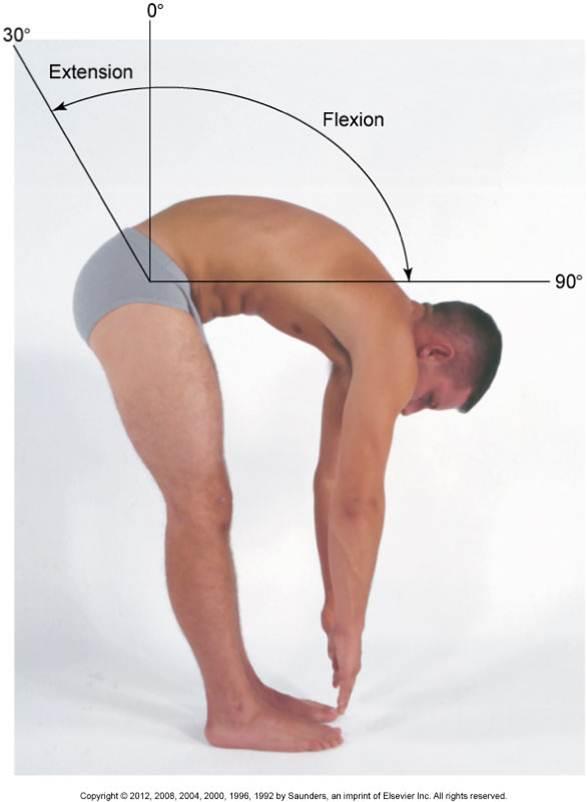
 Range of motion is generally defined as the amount of movement that a joint or body part can move. We measure range of motion (ROM) by standing in an upright position with your hands at your side, which is 0 degrees.  The four movements measured are flexion, extension, lateral flexion and rotation. Flexion is forward bending; extension is bending backward; lateral flexion is side bending; and rotation is a twisting motion.

                                                         
The Cervical Vertebrae
The cervical part of the spine is made up of seven vertebrae, in which the upper two vertebrae have there own names. The first one, atlas, holds up the skull, and is named  after the Greek god who held the heavens upon his shoulders. The second is called the axis, which assists in rotating the head.

     The Thoracic Vertebrae
 The thoracic spine attaches to our ribcage. Range of motion for the thoracic spine include 30 degrees of rotation and 50 degrees of kyphosis. (Kyphosis is just a name for the outward curve of the thoracic spine).

       The Lumbar Vertebrae
The lumbar vertebrae is the largest segment of the spine, helps support the weight of the body, and permit movement. This part of the spine is also one of the most flexible...eh...well maybe more so when done by a contortionist, can you believe this is pretty much all lumbar spine!?


THE TRANSVERSOSPINALES MUSCLES

(Bones and Muscles- An Illustrated Anatomy Virginia Cantarella)


*The multifidus muscle extends and rotates the back. The semispinales muscles; capitis, cervics and thoracacis muscles run over and next to the multifidus muscles. The semispinales muscles extend and rotate the spinal column, and the capitus muscles assist in holding the head erect and turning it.


 Range of Motion in the Neck

The neck supports the weight of our heads, is very flexible, and allows us to twist and turn it in all directions.It has two main pivot points, at the base of the neck and at the top where the head sits.  

I found this section of an article written on this site: http://www.ncbi.nlm.nih.gov/pmc/articles/PMC1250253/#i1062-6050-40-3-155-b16 
to be so informative I felt I should post it here. The citation is can be found at the bottom of this post.


"The cervical spine's range of motion is approximately 80° to 90° of flexion, 70° of extension, 20° to 45° of lateral flexion, and up to 90° of rotation to both sides(Swartz)."

"General flexion and extension motion of the neck does not necessarily reflect the movement among vertebrae in the cervical spine. In fact, a vertebra may experience its greatest range of motion in flexion or extension before the cervical column itself has fully flexed or extended. Furthermore, a vertebra may experience a large range of movement in one direction while the cervical column on the whole exhibits movement in the opposite direction(Swartz)."


 THE STERNOCLEIDOMASTOID MUSCLE


The sternocledodmastoid muscle assists with the rotation of the head and neck and tilting your chin to each side. There are other muscles that help rotate and bend your neck. Such as the rectus capitis lateralis muscle,and the rectus capitis anterior muscle. These are two small muscles shown in red on the model below.

(Bones and Muscles- An Illustrated Anatomy Virginia Cantarella)


Swartz, Erik E., R.T. Floyd, and Mike Cendoma. Cervical Spine Functional Anatomy and the Biomechanics of Injury Due to Compressive Loading. N.p., July 2005. Web.
http://www.livestrong.com/article/257162-normal-human-range-of-motion/#ixzz2ILzzO1lR
Williams, Brady. "Range of Motion Reference Guide." LIVESTRONG.COM. N.p., 14 June 2011. Web. 30 Dec. 2012.
http://www.youtube.com/watch?v=P26fSK6CGYw
http://www.livestrong.com/article/271802-range-of-motion-reference-guide/
 http://www.livestrong.com/article/276514-range-of-motion-of-the-spine/
 http://www.livestrong.com/article/95456-normal-neck-range-motion/
 http://en.wikipedia.org/wiki/Vertebral_column

Sunday, December 23, 2012

Physics in animation

Hey folks, instead of hearing my mouth run about nothing, I decided to post links to some really great resources about the physics of animation. I highly recommend anyone just beginning in animation, or even someone more experienced that never understood the physics behind their animation. To please check these links out, they describe it far better than I ever could.


http://www.animationphysics.com/

Alejandro Garcia a professor in the Department of Physics at San Jose State
 University(website:http://www.algarcia.org/)


http://www.algarcia.org/Pubs/PoAP_Siggraph.pdf

Sunday, December 16, 2012

Tips on Walks

 Small disclaimer, and spoiler alert for those of you who didnt already know...I'm a....complete....NOOB! Yes that's right, so all this jumble of information below you is just some random things I have picked up by research and working on my own walk cycle. I still have a lot to learn myself, but I hope for anyone reading this other than myself, can pick something up from this. If not, at least you know I'm good at wasting your time :).

"Setting the Tempo"

 This is normally this first thing we do before we can eat our walk cycle up. First we gotta set the table boy!

Example of Tempo's from Richard Williams

4 frames- Cartoon Run
6 frames- Realistic run or
8 frames- Normal human run
12 frames- Business like walk/ March Time
16 frames- Strolling walk
20 frames -Elderly or tired
24 frames- slow step
32 frames- even slower


 Lets talk physics

The basic version of it is this, to walk from point A to point B, there need to be acceleration, and in order for there to be acceleration there needs to be a force. With me so far? Hang in there, were almost home. All we feel is us pushing our foot against the ground, and that's half the battle, the other half of it or the "force", comes from the earth itself. So, your foot pushing is the acceleration, and the force is the earth....Gee, I hope the youtube video I got this from is right... This is Newtons Third Law, a push or pull on an object that is resulting from contact with a separate object. I think I got this down, my brain hurts now so I'll move on.

This is a pretty cool site I found on the topic, worth a look:
 http://www.rubberbug.com/walking.htm


Random Garbage

With pretty much all of the average walks I have seen, there seems to always be a pause at the top of the arm swing, and at the back, with a faster motion between the two. Perhaps I can capture this if I am doing this type of walk. People barley pick up there feet, surprised we don't stub our toe more often. While working a walk cycle my mentor peter gave me. I noticed the heel begins to lift off the ground right after the passing position. Furthermore, and this is rather important, the heel rising off the ground on the frame after the passing position is NOT done by rotating the foot back and rising the toes. I found it better to use the ball roll, because then you wont have issues with your foot arc. You transition from ball roll to rotating that foot and rising those toes, it should be a smooth transition into that.


 Ok this is about the fiftieth time I've noticed this, my legs appear to look better when I have a cleaner graph editor. I know this sounds obviously but not really. Check this out. The first picture is what my curve editor looked like before I blew keys away. The second is after. After blowing keys away my legs seem to run smoother. I'm still learning when and how much to change the graph editor and what are good rules of thumb for it.


*Overlapping the hand at end of each swing can really add fluidity to the animation
*DONT make cycles of head action in circles or figures 8's....like I once did....
*Move the shoulder back and forth in an arc
*Shoulders appose hips
*Belt line bends down with lowest leg
*Your feet are never straight ahead of you, never parallel they are typically tilted off its axis. Moreover, the knee control is always pointed over the big toe.


Arm movements,

With the heavy and bulky character I am working with, I was told by a girl working at framestore,  "the weight of the step should influence the swing and thrust the arm forward". Looking at a walk cycle done at ianimate with a similar character, I noticed the lower arm draaaags until it the upper arm is at its peak, and THEN the lower arm catches up. I think this could vary a little bit though, it should look like a nice transition.


Final

This is a walk cycle I did for practice, this is NOT in any way, a good walk cycle. There are a lot of things that can be improved.  I sent this to my mentor, and I got a lot of feedback. Here are a few things the could have made this walk better:

-->  *The hips translate left and right too much
  *The hands don't rotate in a curve. they just remain parallel
   
--> *When the hips are shifting his weight from one leg to the other the rotation begins half way.... too soon. the rotation should hold in place longer and then quickly change as the weight has finally been transferred
 *The feet are too far apart
 *This is a heavy built character, and it would have been nice to show that body builder stature  

This walk too me an awfully long time to get to this level, it was a freaking struggle, especially with the legs. So now...I am going to take everything I have learned doing this walk, and all the notes I have gotten on it, and apply it to the next walk cycle I do! I hope all this stuff helps.

Keep grinding. 


Mute those translations and rotations buddy!

While animating I realized this would be a great tip to jot down before I forget. Right now I am working on a walk cycle, and I had some weird stuff going on in the chest. I wasted a lot of time guessing what the problem could be, instead of muting the rotation values in the channel box one by one until I found the rotation that was screwing up. For any beginners out there like myself I hope this is useful for you!

Keep grinding! :)


Learning things about your rig

Hey there! I know its been a while since my last post but I wanted to show a significant amount of improvement before my next post...and I think I have...just a tiny tiny amount haha. But enough crap talk.

So this post is about...you guessed it..learning your rig. I guess I'm only calling it this because my mistake was caused probably by mere inexperience. Hurricane Sandy hit and knocked out most of my power except for downstairs. So I grabbed my computer lugged it down there, hunched over it, and began animating my new acting shot with excitement.

Man did I think I was bad ass or what, I was smashing through it and the blocking was looking great(for me, to anyone with skills it might make them throw up). But what I failed to realize was this...when I turned my character and moved him I also moved his main root controller under his feet. So when his foot got to the edge of the root circle, I would just move the root control circle forward. This screwed me over big time, because now not only did I have to track the feet but that circle as well! Now I just made my life harder...ok no biggie, but then I realized his path was off. I'm not entirely sure if its because I was too busy gloating over how great I thought this shot was going that I failed to look at the path, or because I just made my life a whole lot more complicated than it had to be. Anyways, the point of  all this is this, I learned something very valuable. On the next shot I did, instead of moving the root control under his feet, I jsut moved the feet out of the cirlcle..yeah...This was like a no brainier after I did it. I have no idea if this is correct or not, I'm just a noob animator trying to learn more everyday. So if there is actually anyone out there reading this, I encourage you to reply if anything is off! This is one reason why I am recording all my mistakes and achievements, to learn from them :).

Until next time, and as Jamaal Bradly says, Grind till the wheels fall off!